
Rummy Gold Login: Complete Registration for Indian Players

Rummy Gold delivers classic 13-card Indian rummy action on your mobile device. This official website walks you through the complete account setup process, from downloading the APK to verifying your identity and resolving login problems.
Access your account within minutes by following the registration steps below. The platform requires basic personal information and document verification to ensure secure gameplay and smooth withdrawals.
Login Details
|
Quick Specs |
Details |
|---|---|
|
Minimum Age |
18+ years |
|
Registration Time |
3-5 minutes |
|
KYC Verification |
ID and address proof required |
|
Withdrawal Minimum |
Check app for current limits |
|
Support Availability |
Contact through in-app support |
How to Install Rummy Gold APK
The Rummy Gold APK file installs directly on Android devices. Visit the official website or authorized download source to get the latest version of the application.
Android devices require permission to install apps from unknown sources. Navigate to Settings > Security > Unknown Sources and enable this option before starting the installation.
Download the APK file to your device:
-
Open your mobile browser
-
Navigate to the official download page
-
Tap the download button
-
Wait for the file to complete downloading
-
Open your Downloads folder
Install the application:
-
Tap the downloaded APK file
-
Review the permissions requested
-
Tap Install
-
Wait for installation to complete
-
Tap Open to launch the app
The app requires Android 5.0 or higher. Check your device specifications if the installation fails due to compatibility issues.
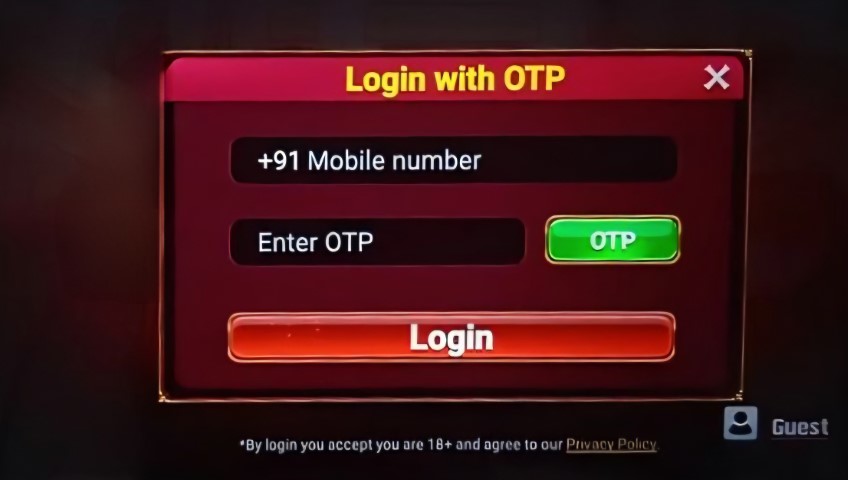
KYC Verification Requirements
Know Your Customer verification proves your identity and address. Complete KYC before making your first withdrawal to avoid processing delays.
Required documents for verification:
-
Government-issued photo ID (Aadhaar card, PAN card, passport, or driver's license)
-
Address proof dated within the last 3 months (utility bill, bank statement, or rent agreement)
-
Clear photo of yourself holding your ID next to your face
Upload your documents through the app:
-
Navigate to Profile or Account Settings
-
Tap KYC Verification
-
Select document type
-
Take or upload a clear photo
-
Submit for review
Verification processing completes within 24-48 hours. The support team contacts you if your documents require resubmission due to clarity issues or information mismatches.
|
Document Type |
Requirements |
|---|---|
|
Photo ID |
Clear, valid, government-issued |
|
Address Proof |
Dated within 90 days |
|
Selfie Verification |
Face clearly visible with ID |
|
Processing Time |
24-48 hours |
Signup Bonus and Withdrawal Information
New players receive a welcome bonus upon account creation. Check the promotions section in the app for current signup offers and bonus amounts.
Bonus funds come with wagering requirements before withdrawal. Play cash games or tournaments to meet the playthrough conditions specified in the bonus terms.
Withdrawal process:
-
Complete KYC verification
-
Navigate to the Wallet or Cashier section
-
Select Withdraw
-
Choose your payment method
-
Enter withdrawal amount
-
Confirm the transaction
Minimum withdrawal limits apply to all payment methods. Check the cashier section for specific amounts and processing times for your chosen withdrawal method.
|
Transaction Type |
Details |
|---|---|
|
Signup Bonus |
Check app for current offer |
|
Minimum Withdrawal |
Varies by payment method |
|
Processing Time |
1-5 business days |
|
KYC Requirement |
Mandatory for first withdrawal |

Common Login Issues and Solutions
Login problems stem from incorrect credentials, network issues, or account restrictions. Most issues resolve quickly with basic troubleshooting steps.
Forgotten password recovery:
-
Tap Forgot Password on the login screen
-
Enter your registered mobile number or email
-
Request a password reset code
-
Enter the verification code received
-
Create a new password
-
Log in with your new credentials
Account locked or suspended:
-
Contact support through the app or website
-
Provide your registered mobile number and email
-
Explain the issue clearly
-
Wait for support team response (24-48 hours)
The platform may lock accounts for security reasons if it detects unusual login patterns or multiple failed login attempts. Verification of your identity resolves most security locks.
Troubleshooting Login Problems
Network connectivity affects login success. Switch between mobile data and Wi-Fi to determine if your internet connection causes the problem.
Clear the app cache if login screens freeze or fail to load:
-
Go to device Settings
-
Navigate to Apps or Application Manager
-
Find Rummy Gold
-
Tap Storage
-
Select Clear Cache
-
Reopen the app
Update the app to the latest version if you experience persistent login failures. Outdated versions may have bugs that prevent successful authentication.
App crashes during login:
-
Restart your device
-
Ensure sufficient storage space (minimum 100MB free)
-
Reinstall the app if crashes continue
-
Check for Android system updates
Geographic restrictions may prevent login from certain locations. The app operates legally in India, but some states have specific regulations regarding real-money gaming.
Account Recovery and Password Reset
Recover your account through mobile number or email verification. The platform sends a secure code to your registered contact information.
Steps for account recovery:
-
Tap Forgot Password or Can't Access Account
-
Select recovery method (mobile or email)
-
Enter your registered mobile number or email address
-
Request the recovery code
-
Check your SMS or email inbox
-
Enter the 6-digit verification code
-
Create a new password
-
Log in immediately with new credentials
Password reset codes expire after 15-30 minutes. Request a new code if your verification code stops working.
Contact support if you no longer have access to your registered mobile number or email:
-
Provide alternative contact information
-
Submit proof of identity (ID documents)
-
Explain why you cannot access your original contact details
-
Wait for manual verification (2-5 business days)
The support team verifies your identity before granting account access through alternative methods. This security measure protects your account from unauthorized recovery attempts.
Contact Support
The support team assists with login issues, account verification, and technical problems. Reach out through the in-app support system for the fastest response.
Support contact methods:
-
In-app chat support
-
Help center and FAQ section
Prepare this information before contacting support:
-
Your registered mobile number
-
Registered email address
-
Description of the problem
-
Screenshots of error messages
-
Device model and Android version
Response times vary based on inquiry complexity and support team availability. Login issues receive priority attention, with responses within 24 hours.
If you need help with gambling-related concerns, contact the National Problem Gambling Helpline at 1800-858-858 or visit www.rgf.org.in.
Frequently Asked Questions
How long does registration take?
Account creation completes in 3-5 minutes. You need a valid mobile number for SMS verification and an email address. The app requires basic personal information including your name, date of birth, and password creation.
What documents are required for KYC verification?
Submit a government-issued photo ID (Aadhaar, PAN, passport, or driver's license), address proof dated within 90 days (utility bill or bank statement), and a selfie holding your ID. Verification processing takes 24-48 hours.
Can I play without completing KYC?
You can play practice games and deposit funds without KYC verification. Withdrawal requests require completed KYC verification. Complete verification early to avoid delays when requesting your first withdrawal.
What should I do if I forget my password?
Tap Forgot Password on the login screen. Enter your registered mobile number or email, request a verification code, and create a new password. The reset code expires after 15-30 minutes.
Why is my account locked?
Accounts lock automatically after multiple failed login attempts or suspicious activity detection. Contact support with your registered mobile number and email to unlock your account. Identity verification may be required.
How do I change my registered mobile number?
Contact support to update your registered mobile number. Submit your current login credentials and identity verification documents. The support team processes number changes within 2-5 business days for security reasons.
Is two-factor authentication available?
Check the security settings in your account profile for two-factor authentication options. This feature adds an extra layer of security by requiring a verification code during login attempts from new devices.